The AI App Builder for Enterprise Internal Tools
Describe the tool your team needs and Arkios builds it — a working internal app connected to your data, refined in a visual editor, and deployed to your team in minutes.
What is an AI app builder?
An AI app builder is software that turns a plain-language description of an internal tool into a working application. Instead of writing code or dragging components onto a canvas, you describe what the app should do — track deals, route approvals, monitor operations — and the AI generates the interface, logic, and data connections for you.
An enterprise AI app builder goes further than consumer no-code tools: the apps it produces connect to your company's real systems, data, and AI agents, and they live behind role-based access controls so IT decides who can build, manage, and use them. The result is governed software, not shadow IT.
Arkios calls this a software factory. Every team can manufacture the internal apps it needs — a lightweight CRM, an ops dashboard, an approval workflow — refine them in a full app editor, and publish them to an internal marketplace where the rest of the company can install them.
What you get
Describe it, and AI builds it
Tell Arkios what internal tool you need in plain language — "a CRM for our partnerships team" or "a dashboard tracking open tickets by region" — and the AI generates a working app with screens, logic, and data wiring. A first usable version arrives in minutes, not sprints.
A full app editor, not a black box
Every generated app opens in a complete editor and IDE, including a visual, Figma-like surface for building UI. Adjust layouts, rename fields, add views, or change behavior — by describing the change or editing directly. You are never stuck with whatever the AI produced first.
Connected to your data, integrations, and agents
Apps built in Arkios are not isolated toys. They plug into your existing integrations, your enterprise data, and your AI agents on the same platform — so a CRM app reads real accounts, and an ops tool can trigger an agent to act on what it shows.
An internal marketplace for apps and bundles
Publish finished apps and bundles to your company's internal marketplace, where other teams can discover and install them in one click. Build a tool once — an approval workflow, a request tracker — and let every department reuse it instead of rebuilding it from scratch.
Governance and role-based access built in
Admins control who can build apps, who can manage and edit them, and who can use them — with role-based access enforced across the platform. Teams move fast without creating ungoverned shadow IT, and IT keeps a clear view of every app running in the company.
How it works
- 1
Describe the tool you need
Write a plain-language description of the internal app — what it tracks, who uses it, what it should connect to. No specs, wireframes, or tickets required.
- 2
AI generates the app
Arkios builds a working application from your description: screens, fields, logic, and connections to your enterprise data and integrations. A real, usable first version — in minutes.
- 3
Refine it in the editor
Open the app in the full editor and IDE. Polish the UI on the visual canvas, adjust logic, wire in additional data sources or agents, and iterate until it fits exactly how your team works.
- 4
Deploy and share
Deploy the app to your team instantly inside the platform, or publish it to the internal marketplace so other departments can install it. Role-based access controls who sees and manages what.
Use cases
A lightweight CRM in minutes
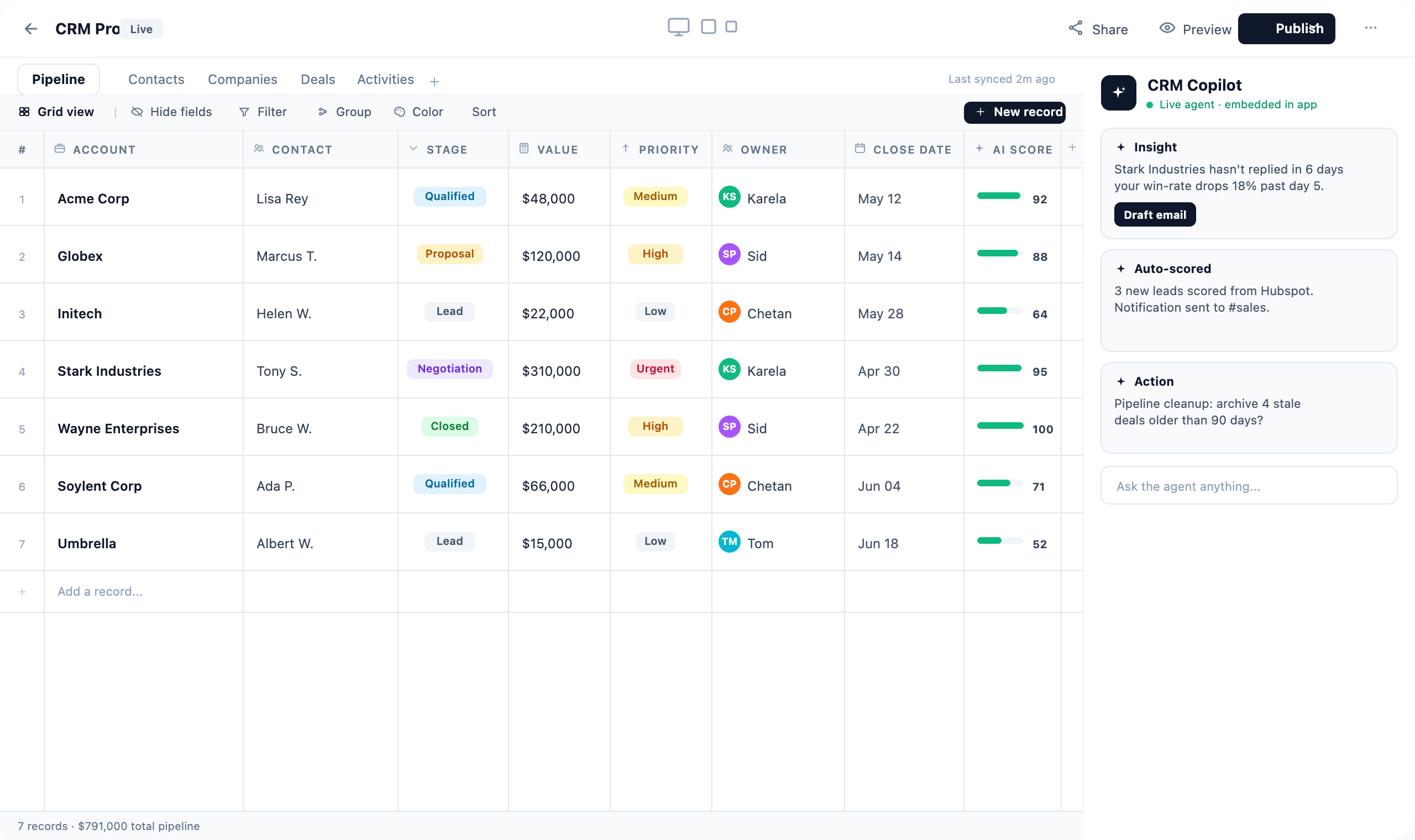
Sales or partnerships teams that don't need a heavyweight CRM describe the pipeline they actually run — stages, accounts, owners, notes — and get a tailored CRM app connected to their real data. The example CRM on this page was generated exactly this way, then refined in the editor.
Operational dashboards
Build live dashboards over the systems your team already uses — tickets, orders, inventory, deployments — without waiting on a BI backlog. Because apps connect to your integrations and enterprise data, the numbers are real, current, and visible to exactly the roles you choose.
Approval and request workflows
Replace email threads and Slack pings with structured apps for purchase approvals, access requests, content sign-off, or expense exceptions. Requests get a form, a status, and an owner — and once one team's workflow works, publish it to the marketplace for everyone else.
Retiring spreadsheet processes
Every company runs critical processes on fragile shared spreadsheets — headcount trackers, vendor lists, onboarding checklists. Describe the process and Arkios turns it into a proper app with validation, access control, and a real interface, so the single source of truth stops living in someone's tabs.
Frequently asked questions
Can AI really build internal business apps?
Yes — for the internal tools most teams need, this works today. You describe the app and Arkios generates a working version with UI, logic, and connections to your data. The key is the full editor behind it: AI produces the first version fast, and your team refines it until it fits, rather than accepting generated output as-is.
Do we need developers to build or maintain these apps?
No. Anyone granted build permission can describe an app and refine it in the visual editor — no code required. Developers can go deeper in the app IDE when they want to, but maintenance is typically a matter of describing changes or editing in the visual canvas, not managing a codebase.
Can apps connect to our existing systems and data?
Yes. Apps built in Arkios connect to the integrations, enterprise data, and AI agents already configured on your platform. A CRM app works with your real accounts, a dashboard pulls live numbers from your systems, and an ops app can hand work to an agent — all within the access controls your admins set.
How do we keep AI-built apps secure and governed?
Role-based access control covers the full lifecycle: admins decide who can build apps, who can manage and edit them, and who can use them. Apps deploy inside the Arkios platform rather than as standalone tools, and the internal marketplace keeps sharing visible and controlled — so you get speed without shadow IT.
How much does the Arkios app builder cost?
The App Builder is included in Arkios Enterprise at a flat $25 per user per month — covering the software factory, AI agents, integrations, the document engine, and the rest of the platform. There are no per-app fees or usage tiers, and every team can start with a 14-day free trial.
Explore the platform
Deploy AI across your enterprise
One platform, one price — $25/user/month with a 14-day free trial. No per-agent fees, no usage surprises.
Start now